|
|
CHARACTER UNITSName:
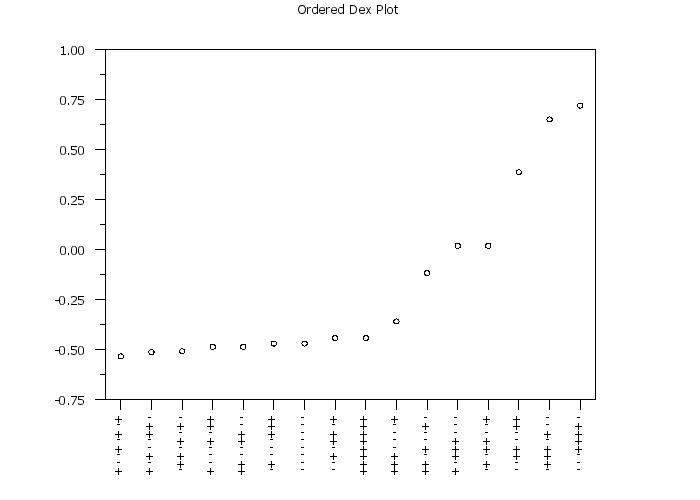
There may be occassions where it is useful to have the coordinates specify screen units (i.e., 0 to 100). This is most likely when the plot character is being used in a labeling context. For example, it can sometimes be more efficient from a performance context to use the CHARACTER command rather than using a series of MOVE and TEXT commands to generate the labels. The CHARACTER UNITS command can be used to specify whether data units or screen units will be used. Specifically,
where <val> specifies the desired units. Up to 100 character unit values can be specified.
CHARACTER UNITS SD ALL
. Step 1: Read the data
.
dimension 200 columns
skip 25
read scott_8_16.dat y x1 to x8
skip 0
let n = size y
.
. Step 2: Set plot control features
.
case asis
title case asis
label case asis
tic mark label case asis
.
xlimits 1 n
major x1tic mark number n
minor x1tic mark number 0
x1tic mark offset 0.5 0.5
x1tic mark labels off
.
ylimits -0.75 1
major y1tic mark number 8
y1tic mark label decimal 2
.
title Ordered Dex Plot
.
line blank
character circle
character hw 1 0.75 all
character fill on
.
. Step 3: Generate the plot
.
set dex pareto plot order ascending
set dex ordered plot identification on
dex ordered plot y x1 to x8
.
. Step 4: Plot the "-" and "+"
.
read dpst1f.dat zx zfact zcode
let zcode = code zcode
.
line blank blank
character - +
character size 1.5 all
.
let zfacts = zfact
let zfacts = 16 subset zfact = 1
let zfacts = 14.5 subset zfact = 2
let zfacts = 13 subset zfact = 3
let zfacts = 11.5 subset zfact = 4
let zfacts = 10 subset zfact = 5
let zfacts = 8.5 subset zfact = 6
let zfacts = 7 subset zfact = 7
let zfacts = 5.5 subset zfact = 8
.
tic marks off
tic mark labels off
label
title
pre-erase off
.
character units ds all
plot zfacts zx zcode
| |||||||||||||||||||||||||||||||||||||||||||||||||||||||||||||||||||||||