
|
|
TUKEY MEAN-DIFFERENCE PLOTName:
A quantile-quantile plot (or q-q plot) is a graphical data analysis technique for comparing the distributions of 2 data sets. The quantile-quantile plot is a graphical alternative for the various classical 2-sample tests (e.g., t for location, F for dispersion). The plot consists of the following:
Horizontal axis = estimated quantiles from data set 2. The "quantiles" of a distribution are the distribution's "percent points" (e.g., .5 quantile = 50% point = median). The advantage of the quantile-quantile plot is 2-fold:
The quantile-quantile plot has 2 components:
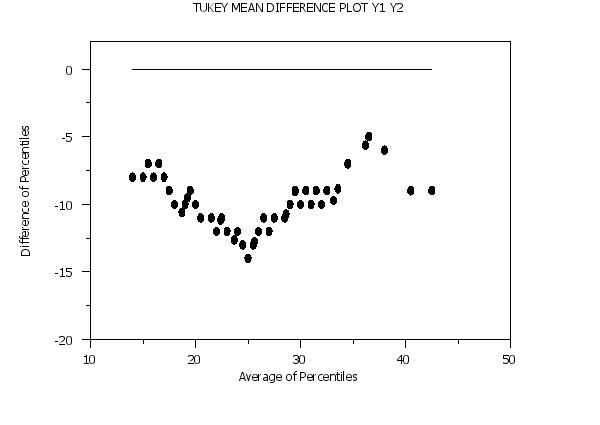
Given a q-q plot, assume its y coordinates are in T(i) and its x coordinates are in D(i), then the Tukey mean-difference is defined as:
Horizontal axis = (T(i) + D(i)/2. The Tukey mean-difference plot also plots a horizontal reference line at zero. That is, it plots the difference of the quantiles against their average. The advantage of the Tukey mean-difference compared to the q-q plot is that it converts interpretation of the differences around a 45 degree diagonal line to interpretation of differences around a horizontal zero line. However, the Tukey mean-difference plot should only be applied if the two variables are on a common scale. Like usual, the appearance of the 2 components is controlled by the first 2 settings of the CHARACTERS and LINES commands. It is typical for the response points to be represented as some character, say X's, with no connecting line, and the reference line as a connected line with no character. This is demonstrated in the sample program below.
<SUBSET/EXCEPT/FOR qualification> where <y1> is the first response variable; <y2> is the second response variable; and where the <SUBSET/EXCEPT/FOR qualification> is optional.
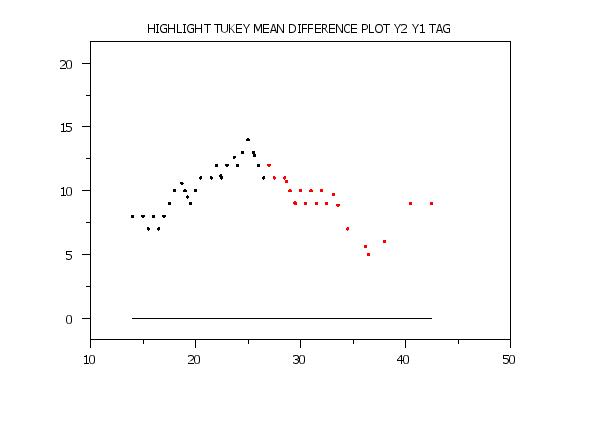
<SUBSET/EXCEPT/FOR qualification> where <y1> is the first response variable; <y2> is the second response variable; <tag> is the group-id variable that defines the highlighting; and where the <SUBSET/EXCEPT/FOR qualification> is optional. This syntax can be used to plot different plot points with different attributes. For example, it can used to highlight groups in the data or to emphasize the extremes.
TUKEY MEAN DIFFERENCE PLOT RUN1 RUN2 TUKEY MEAN DIFFERENCE PLOT BATCH1 BATCH2 TUKEY MEAN DIFFERENCE PLOT Y1 Y2 SUBSET AUTO 4 TUKEY MEAN DIFFERENCE PLOT Y1 Y2 SUBSET STATE 25
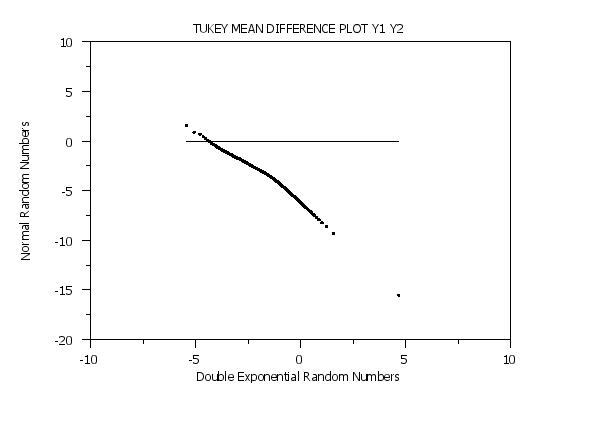
LET X = SEQUENCE .01 .01 .99 LET Y2 = NORPPF(X) TUKEY MEAN DIFFERENCE PLOT Y1 Y2 This same technique can be used other distributions (use the appropriate PPF function).
<value> where <value> specifies the desired number of quantiles. This is demonstrated in the Program 2 example below.
Chambers, Cleveland, Kleiner, and Tukey (1983), "Graphical Methods of Data Analysis", Wadsworth, pp. 48-57.
SKIP 25
READ AUTO83B.DAT Y1 Y2
.
DELETE Y2 SUBSET Y2 < 0
LINE BLANK SOLID
CHARACTER CIRCLE BLANK
CHARACTER FILL ON OFF
TIC OFFSET UNITS DATA
YTIC OFFSET 0 2
TITLE AUTOMATIC
LABEL CASE ASIS
Y1LABEL Difference of Percentiles
X1LABEL Average of Percentiles
TUKEY MEAN DIFFERENCE PLOT Y1 Y2
 Program 2:
LET Y1 = NORMAL RANDOM NUMBER FOR I = 1 1 1000000
LET Y2 = DOUBLE EXPONENTIAL RANDOM NUMBER FOR I = 1 1 1000000
.
LINE BLANK SOLID
CHARACTER CIRCLE BLANK
CHARACTER FILL ON OFF
CHARACTER HW 0.5 0.375
TITLE AUTOMATIC
TITLE OFFSET 2
LABEL CASE ASIS
Y1LABEL Normal Random Numbers
X1LABEL Double Exponential Random Numbers
.
SET QUANTILE QUANTILE PLOT NUMBER OF PERCENTILES 1000
TUKEY MEAN DIFFERENCE PLOT Y1 Y2
 Program 3:
SKIP 25
READ AUTO83B.DAT Y1 Y2
DELETE Y2 SUBSET Y2 < 0
.
LINE BLANK BLANK SOLID
CHARACTER CIRCLE CIRCLE BLANK
CHARACTER FILL ON ON OFF
CHARACTER HW 0.5 0.375 ALL
CHARACTER COLOR BLACK RED
TITLE AUTOMATIC
TITLE OFFSET 2
TIC MARK OFFSET UNITS SCREEN
YTIC MARK OFFSET 5 5
.
LET N2 = SIZE Y2
LET TAG = 1 FOR I = 1 1 N2
LET TAG = 2 SUBSET Y2 > 32
.
HIGHLIGHT TUKEY MEAN DIFFERENCE PLOT Y2 Y1 TAG
Date created: 06/05/2001 |
Last updated: 12/04/2023 Please email comments on this WWW page to [email protected]. | ||||||||||||||||||||||