
|
|
REGION FILL COLORName:
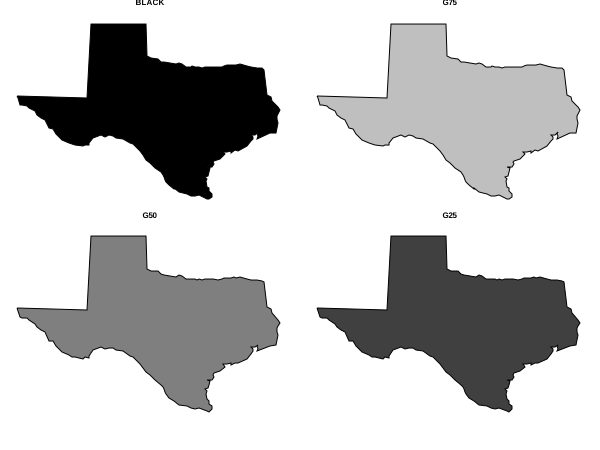
The diagrammatic graphics commands CIRCLE, CUBE, DIAMOND, ELLIPSE, HEXAGON, PYRAMID, SEMI-CIRCLE, and TRIANGLE can be filled using the REGION FILL command. The BOX command has its own attribute setting commands. Dataplot provides two methods for specifying colors.
When setting the region fill color, Dataplot first checks if the device supports RGB colors. If not, the named color will be used. If the device does support RGB color, Dataplot will check if an RGB color has been specified. If yes, then that RGB color is used. If not, the named color will be used. To see the list of supported named colors (with the associated index number), see https://www.itl.nist.gov/div898/software/dataplot/refman1/ch11/homepage.htm
where <color> is a character string or index number that specifies the desired color. Up to 100 region fill colors can be specified.
where <ired> specifies the red component of the region fill color; <igreen> specifies the green component of the region fill color; and <iblue> specifies the blue component of the region fill color. Up to 100 triplets of RGB colors can be specified. The components should be integer values in the range 0 - 255. To turn off the RGB color, set the components to -1 (any negative value will work and if any of the three components is negative the RGB color will be turned off).
REGION FILL COLOR BLACK ALL REGION FILL COLOR ALL BLACK REGION FILL COLOR REGION FILL RGB COLOR 201 101 88 REGION FILL RGB COLOR 201 101 88 ALL REGION FILL RGB COLOR 201 101 88 240 200 175 REGION FILL RGB COLOR -1 -1 -1 ALL
2021/11: Support for RGB color
SKIP 25
READ TEXAS.DAT X Y
.
FRAME OFF
FRAME CORNER COORDINATES 5 5 95 95
MULTIPLOT 2 2; MULTIPLOT CORNER COORDINATES 0 0 100 100
REGION BASE POLYGON
REGION FILL ON
TITLE BLACK
PLOT Y X
REGION FILL COLOR G75
TITLE G75
PLOT Y X
REGION FILL COLOR G50
TITLE G50
PLOT Y X
REGION FILL COLOR G25
TITLE G25
PLOT Y X
END OF MULTIPLOT
 Program 2:
skip 25
read wright11.dat pressure angle wing
let angled = distinct angle
let nangle = size angled
let wingd = distinct wing
let nwing = size wingd
.
title case asis
title offset 2
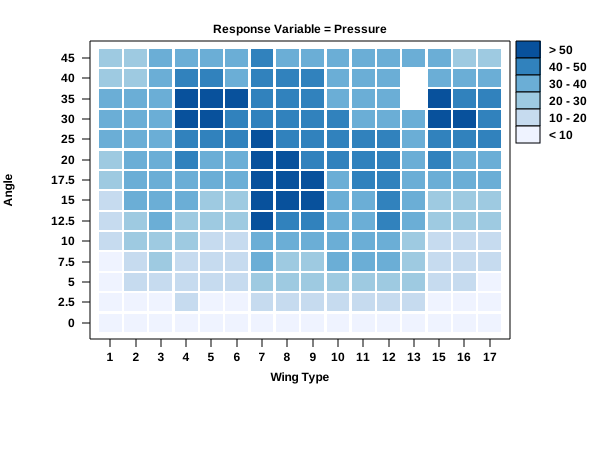
title Response Variable = Pressure
label case asis
x1label Wing Type
y1label uc()Alc()ngle
y1label displacement 12
tic offset units data
x1limits 1 nwing
major xtic mark number nwing
minor xtic mark number 0
xtic mark offset 0.8 0.8
x1tic mark label format alpha
x1tic mark label content 1 2 3 4 5 6 7 8 9 10 11 12 13 15 16 17
y1limits 1 nangle
major ytic mark number nangle
minor ytic mark number 0
y1tic mark offset 0.8 0.8
y1tic mark label format alpha
y1tic mark label content 0 2.5 5 7.5 10 12.5 15 17.5 20 25 30 35 40 45
.
let ylevel = data 10 20 30 40 50
region fill on all
region fill color   red orange yellow green cyan blue
region border color red orange yellow green cyan blue
line color          red orange yellow green cyan blue
region fill rgb color   239 243 255  198 219 239  158 202 225 ...
                        107 174 214   49 130 189    8  81 156
region border rgb color 239 243 255  198 219 239  158 202 225 ...
                        107 174 214   49 130 189    8  81 156
line color              239 243 255  198 219 239  158 202 225 ...
                        107 174 214   49 130 189    8  81 156
.
tabulation mean plot pressure angle wing ylevel
.
box fill pattern solid
box shadow hw 0 0
.
box fill color blue
box fill rgb color 8 81 156
box 86 90 90 86
move 91 87; text > 50
.
box fill color cyan
box fill rgb color 49 130 189
box 86 86 90 82
move 91 83; text 40 - 50
.
box fill color green
box fill rgb color 107 174 214
box 86 82 90 78
move 91 79; text 30 - 40
.
box fill color yellow
box fill rgb color 158 202 225
box 86 78 90 74
move 91 75; text 20 - 30
.
box fill color orange
box fill rgb color 198 219 239
box 86 74 90 70
move 91 71; text 10 - 20
.
box fill color red
box fill rgb color 239 243 255
box 86 70 90 66
move 91 67; text < 10
|
Privacy
Policy/Security Notice
NIST is an agency of the U.S.
Commerce Department.
Date created: 03/30/2021 | |||||||||||||||||||||||||||||||||||||